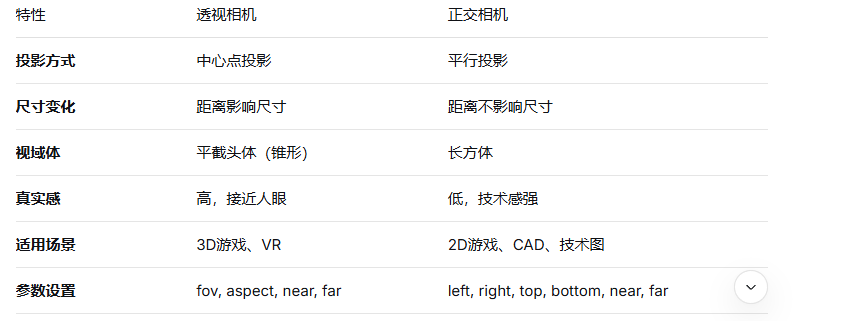
在 Three.js 中,透视相机(PerspectiveCamera) 和 正交相机(OrthographicCamera) 是两种最常用的相机类型,它们模拟了不同的投影方式,适用于不同的场景需求。
透视相机模拟了人眼的视觉效果,具有近大远小的透视关系,物体距离相机越远看起来越小。
javascript
// 参数:视野角度(fov),宽高比(aspect),近平面(near),远平面(far)
const camera = new THREE.PerspectiveCamera(
  75, // fov (degrees)
  window.innerWidth / window.innerHeight, // aspect ratio
  0.1, // near plane
  1000 // far plane
);透视效果:符合真实世界的视觉体验
锥形视域体:从近平面到远平面逐渐扩大
常用场景:游戏、3D可视化、虚拟现实等需要真实感的场景
正交相机采用平行投影,没有透视变形,物体大小与距离无关,常用于工程制图或2.5D游戏。
javascript
// 参数:左、右、上、下、近、远
const camera = new THREE.OrthographicCamera(
  window.innerWidth / -2, // left
  window.innerWidth / 2,  // right
  window.innerHeight / 2, // top
  window.innerHeight / -2, // bottom
  0.1, // near
  1000 // far
);无透视变形:保持物体的实际尺寸比例
矩形视域体:所有投影线平行
常用场景:CAD软件、2D游戏、UI界面、等距视图
text
    物体A (近)       物体B (远)
       大               小
       ▲               ▲
       │               │
       │               │
相机───────────────►text
    物体A (近)       物体B (远)
       大               大
       ▲               ▲
       │               │
       │               │
相机───────────────►需要真实的3D沉浸感
开发第一/第三人称游戏
创建虚拟漫游体验
需要深度感知的3D可视化
开发2D或2.5D游戏
创建UI/菜单系统
需要精确尺寸测量的应用
CAD或技术制图软件
等距视角游戏(如《暗黑破坏神》风格)
javascript
// 透视相机示例 - 用于3D场景
const perspectiveCamera = new THREE.PerspectiveCamera(
  60,
  window.innerWidth / window.innerHeight,
  0.1,
  1000
);
perspectiveCamera.position.set(0, 10, 20);
perspectiveCamera.lookAt(0, 0, 0);

// 正交相机示例 - 用于2D/UI
const orthographicCamera = new THREE.OrthographicCamera(
  window.innerWidth / -2,
  window.innerWidth / 2,
  window.innerHeight / 2,
  window.innerHeight / -2,
  0.1,
  1000
);
orthographicCamera.position.set(0, 0, 10);javascript
// 透视相机响应式调整
function onWindowResize() {
  // 透视相机
  perspectiveCamera.aspect = window.innerWidth / window.innerHeight;
  perspectiveCamera.updateProjectionMatrix();

  // 正交相机
  orthographicCamera.left = window.innerWidth / -2;
  orthographicCamera.right = window.innerWidth / 2;
  orthographicCamera.top = window.innerHeight / 2;
  orthographicCamera.bottom = window.innerHeight / -2;
  orthographicCamera.updateProjectionMatrix();
}在某些应用中,可以同时使用两种相机:
javascript
// 主场景使用透视相机
const sceneCamera = new THREE.PerspectiveCamera(...);

// UI元素使用正交相机
const uiCamera = new THREE.OrthographicCamera(...);

// 渲染时先渲染3D场景,再渲染UI层
renderer.autoClear = false;
renderer.clear();
renderer.render(scene3D, sceneCamera);
renderer.clearDepth(); // 清除深度缓冲区
renderer.render(sceneUI, uiCamera);
选择哪种相机取决于你的项目需求。对于大多数3D应用,透视相机是默认选择;而对于需要精确尺寸或2D效果的应用,正交相机更合适。